
How to Get Your Small Business Website Ranking on Google
The exact on-page, technical and local SEO steps I use to get Edmonton, St. Albert and Sherwood Park business websites found on Google.


SEO (search engine optimization) is the work of making your website the best answer to what people type into Google. Google wants to show searchers the most useful, trustworthy page for their question. My job is to make sure that page is yours. In this post I’ll show you exactly what I do for my clients in Edmonton, St. Albert and Sherwood Park, step by step, with no jargon and no secret formulas.
Step 1: Find the Searches Your Customers Actually Use
Every SEO project starts with keyword research. Before I touch a single page, I find out what your customers type into Google when they need what you sell. A plumber might think of their service as “residential plumbing solutions,” but their customers search for “plumber near me” or “emergency plumber Edmonton.” If your site doesn’t use the words your customers use, Google has a harder time matching you to their search.
I look at three things for each search:
- Intent. Is the person ready to hire, or still researching? “Furnace repair Edmonton” is a buyer. “Why is my furnace making noise” is a researcher.
- Location. Local businesses need local searches. Someone in St. Albert searching for your service is often a better lead than someone searching across the whole province.
- Competition. Some searches are crowded with big companies and directories. Others are wide open.
Here’s a real example from my own website. Between July and October 2026, I had one service page trying to rank for web design in Edmonton, St. Albert and Sherwood Park at the same time. Google Search Console showed my average position was about 14 for St. Albert searches and about 18 for Sherwood Park searches. For Edmonton, it was about 62. That’s the difference between page two and page seven of Google. My best St. Albert search, “web design st albert,” sat at about position 10, and “web designer sherwood park” sat at about 9.9.
One page can’t be the best answer for three different cities. Smaller markets like St. Albert and Sherwood Park have less competition, so even a shared page did reasonably well there. Edmonton is far more competitive, and a general page wasn’t going to cut it. That’s the case for a dedicated page for each location you serve, which I cover in Step 4.
Step 2: On-Page SEO
On-page SEO is everything on the page itself that tells Google what it’s about and whether it’s worth showing.
Title Tags and Meta Descriptions
The title tag is the blue headline people see in Google results. It’s one of the strongest signals you control. A good title tag says what the page offers and where, in plain words, in about 60 characters. The meta description is the short summary under it. It doesn’t directly change your ranking, but a clear one gets more people to click.
Here’s a before and after from Natural Cleaning Crew, a cleaning company whose Wix website I rebuilt:
- Before: “Home | Ledgerbookkeeping”
- After: “North Carolina Natural Cleaning Services | Natural Cleaning Crew”
The old title was left over from a website template. It didn’t name the business, the service or the area, so it gave Google nothing useful to match. The new one says what the company does and where, and keeps the business name at the end.
Headings
Each page gets one main heading (the H1) that matches what the page is about. The sections below it use H2 and H3 headings in order, like an outline. This helps visitors skim, and it helps Google understand how the page is organized.
Content That Answers the Question
This is where most small business sites fall short. A service page that says “We offer quality service at fair prices” doesn’t answer anything. I write pages that answer the questions a customer has before they call: what’s included, how long it takes, what areas you serve, what it costs or what affects the cost, and why they should trust you. When a page answers the question better than the competition, it has a real shot at ranking.
Internal Links
Internal links connect your pages to each other. They help visitors find related information, and they help Google find and understand every page on your site. I link service pages to location pages, blog posts to the services they relate to, and use anchor text that describes where the link goes. “See my St. Albert web design page” tells Google far more than “click here.”
Image Alt Text
Alt text is a short description of an image. Screen readers read it aloud for people who can’t see the image, and Google uses it to understand what the image shows. I write alt text that describes the actual photo, not a list of keywords.
Step 3: Technical SEO
Technical SEO makes sure Google can find, load and understand your site without problems. Most owners never see this part, but it can hold back an otherwise great website.
Page Speed and Core Web Vitals
Core Web Vitals are Google’s measurements of how fast a page loads, how quickly it responds when someone taps it and whether the layout jumps around while it loads. Slow sites lose visitors, especially on phones. I build sites that load fast from the start instead of trying to fix a slow site later. That’s a big part of why I now build with Astro. I explain why in my post on WordPress vs Astro for Edmonton businesses.
Mobile-Friendly Design
Google looks at the mobile version of your site first when it decides how to rank it. Most local searches happen on phones. Every site I build is designed for small screens first, with tap-friendly buttons and text you can read without zooming.
Clean HTML and Heading Structure
Clean code makes it easier for Google to read your pages. I use proper HTML elements for what they are: real headings, real lists, real links and real buttons. No headings used just to make text bigger and no important text hidden inside images.
Sitemap and Robots.txt
A sitemap is a list of every page you want Google to find. The robots.txt file tells search engines which parts of the site they can crawl. I set up both on every site and submit the sitemap in Google Search Console, so new pages get found faster.
Schema Markup
Schema markup is extra code that tells Google exactly what something is: a local business, a service, a blog post or a list of FAQs. It doesn’t show on the page, but it can help Google show richer results, like your business details or star ratings. I add the schema types that fit each page.
Step 4: Local SEO
For a local business, local SEO is often where the fastest wins are. It’s what gets you into the map results when someone searches for your service nearby.
Google Business Profile
Your Google Business Profile is the listing that shows on Google Maps and in the map pack. I make sure it’s complete: the right categories, service areas, hours, photos and a link to the right page on your site. A complete, active profile is one of the biggest factors in local rankings.
Reviews
Reviews build trust with customers and with Google. I help clients set up a simple way to ask for reviews, like a short link they can text to a happy customer. Steady, genuine reviews beat a burst of reviews all at once. Replying to reviews, good and bad, also shows you’re active.
Consistent Name, Address and Phone
Your business name, address and phone number should match everywhere they appear: your website, your Google profile, Facebook and every directory. Mismatched details make Google less sure which listing is the real you.
Local Directories and Citations
A citation is any mention of your business details on another website. Quality local listings help Google confirm you’re a real, local business. For example, I’m a member of the St. Albert & District Chamber of Commerce. Chambers of commerce, industry directories and local associations are worth the effort. Hundreds of spammy directory listings are not.
Dedicated Location Pages
Remember the Search Console numbers from Step 1? One page can’t rank well for every city. If you serve more than one area, each one deserves its own page with real local content, not the same text with the city name swapped. You can see how I do this on my own St. Albert web design page, Sherwood Park web design page and my Leduc page.
Step 5: Off-Page SEO
Off-page SEO is everything outside your website that builds its reputation.
- Backlinks. A backlink is a link from another website to yours. Links from relevant, trusted local sites act like votes of confidence. One link from a respected local organization is worth more than dozens from random sites.
- Brand mentions. When people talk about your business online, in local news, community groups or industry sites, it builds the trust signals Google looks for.
- Partnerships. Working with businesses that serve the same customers is one of the most natural ways to earn links and mentions. For example, Andrew Kim of YEG Bookkeeping wrote a guest post for my blog on when it’s time to get help with your small business. His readers get useful advice, and both of our businesses get in front of new people.
I don’t buy links or use link schemes. They can get a site penalized, and they don’t build anything that lasts.
What Results Look Like
A couple of years ago I redesigned the website for All India Restaurant & Sweets. It went from an old-school look to a modern restaurant site. Today it gets about 11,000 impressions a month in Google search and 837 visitors a month. An impression is each time the site shows up in someone’s search results, so the restaurant is in front of potential customers more than 10,000 times every month.
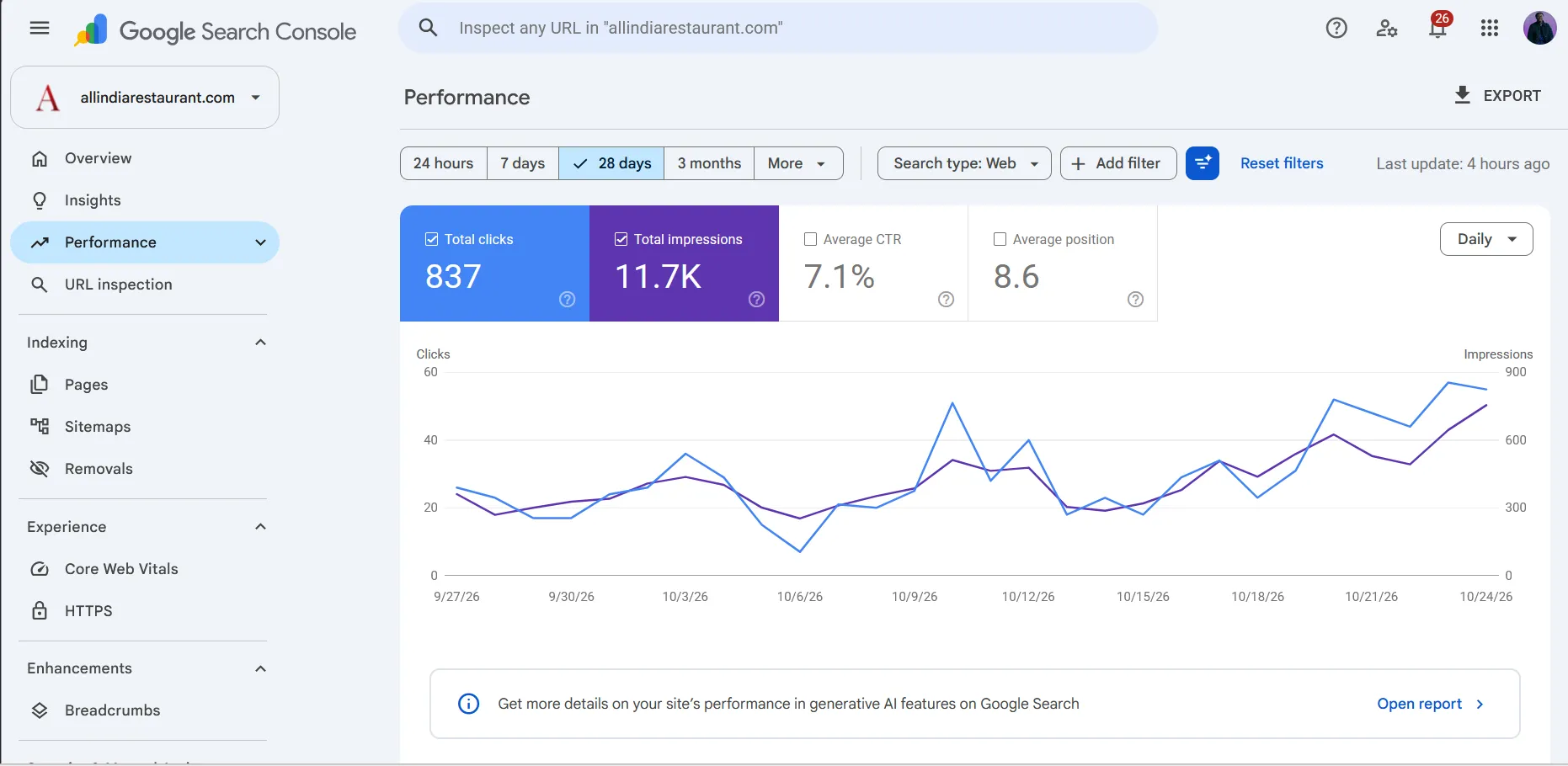
That’s the goal of all five steps: showing up for the right searches, often enough that real customers find you.
How Long Does SEO Take?
In my experience, you can usually start to see results in about 3 months. That’s when new pages tend to get picked up, rankings start to move and your Google Business Profile changes take hold. Competitive searches in a big market like Edmonton can take longer. Smaller markets and less crowded searches often move faster.
SEO isn’t a switch you flip. It builds over time, and the work you do now keeps paying off for years if you keep your site healthy. Be wary of anyone who promises first-page rankings in a few weeks. Nobody controls Google, and those promises usually come with shortcuts that backfire.
AI tools are changing how people search too, but the basics in this post still apply. I share my take on that in Will AI replace web designers?.
If you’d rather have someone handle all of this for you, take a look at my Edmonton SEO services.
Frequently Asked Questions
How much does SEO cost in Edmonton?
For most small businesses, ongoing SEO costs between $500 and $2,000 a month. Where you land depends on how competitive your industry is, how many locations you want to rank in and how much content needs to be written. I'll give you a clear price after I look at your site and your competitors.
Can I do SEO myself?
Yes, a lot of it. You can set up and update your Google Business Profile, ask happy customers for reviews and write helpful pages about your services. The technical side, like site speed, schema markup and fixing crawl errors, is where most owners get stuck and where hiring help saves the most time.
Does a new website hurt my rankings?
Not if it's done properly. Keep your existing URLs where you can, and set up 301 redirects from every old URL that changes to its new address. That tells Google where each page moved, so the rankings you've earned carry over. Most ranking drops after a redesign come from skipping this step.
Do I need a blog?
Not always. Strong service pages and location pages do most of the work for local businesses. A blog helps when it answers real questions your customers ask, because those posts can rank for searches your service pages can't and give you more pages to link from.